Control a Ragdoll Together Getting Started Guide
Join the lobby, claim a limb, and survive your first shared-puppet runs.
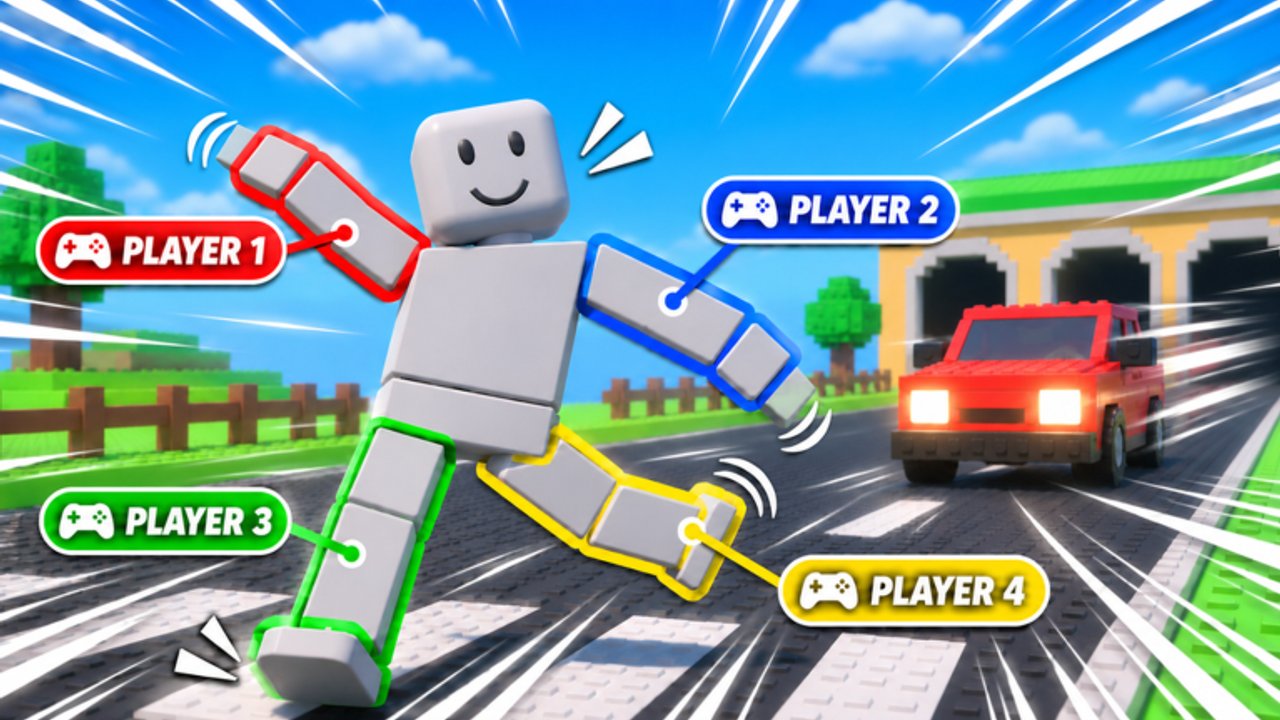
Control a Ragdoll Together! throws you into a free Roblox obby where one ragdoll body answers to as many as four players. If you expect a normal platformer avatar, the first minute feels chaotic—in a good way. This beginner guide covers how to join from the official page, pick a limb, clear early Plains rooms, use checkpoints, and read the whose fault blame system without rage-quitting.
Creator group Ragdoll Obby Games launched the place on 3 November 2026 (place 135073285528385). Voice Chat and Camera are listed as not supported, so plan your callouts before you need them. For seating theory later, skim the tier list and players hub.
Step 1 — Open the real game
Use the Control a Ragdoll Together Roblox page rather than random sponsored teleports. Confirm the title and creator group, then press play. Server size can list around 16, but the fantasy is still a small team on one puppet inside that instance.
If friends are joining, decide in advance whether you want solo practice, a duo, or a fuller stack. Brand-new players usually learn faster as a duo so each person only owns a couple of limbs.
Step 2 — Claim a limb role
After loading, the lobby flow asks you to take a seat on the shared body—commonly left/right arms and left/right legs, sometimes with torso or head influence. Tips for your first claim:
- Take a leg if you want simpler early walking cadence.
- Take an arm if you already watch climbing games and want monkey-bar reps.
- Say your seat in chat immediately (“I’m right arm”) so nobody double-claims mentally.
- Reminder: you can still play solo; you will just puppet more of the body yourself.
Detailed input habits live in the controls guide. Do not skip it after your first wipe.
Step 3 — Survive the Plains
The campaign opens in the Plains, the gentlest of the eight worlds that eventually reach the Ember Core. Early rooms teach:
- Walking without yanking opposite limbs
- Small hops onto safe platforms
- First contact with low-stakes obstacles before spikes and meteors stack up
Move slower than your pride wants. Most beginner fails come from one player mashing while another stands still. Agree on a simple “3-2-1 go” before jumps. More advanced callout scripts are in co-op tips.
Step 4 — Treat checkpoints like save states
Checkpoints exist so a single hammer mistake does not erase twenty minutes. When you touch a new checkpoint:
- Stop moving for one second so every limb owner notices.
- Call “checkpoint” in chat.
- Optionally remount seats if someone is on the wrong role for the next hazard type.
- Only then pull forward.
If your team is tilting, take a thirty-second break at the checkpoint instead of speed-running straight into the same trap. The worlds walkthrough explains how checkpoint density feels as difficulty rises.
Step 5 — Read the blame system calmly
When you fail, Control a Ragdoll Together highlights which limb caused the wipe—the comedy “whose fault” layer. Use it as coaching, not courtroom evidence.
- If your limb is flagged, name the mis-input (“early release”) and the fix.
- If a teammate is flagged, offer one concrete tip, then ready up.
- Never stack insults; you still need that player’s thumb on the next bar.
Teams that laugh at the popup clear more rooms than teams that open a trial.
First-session checklist
- Joined from the official Roblox URL
- Announced limb seat in chat
- Completed at least one Plains checkpoint loop
- Survived a basic jump without panic mashing
- Read one blame popup and adjusted on purpose
- Bookmarked obstacle guide for bars, walls, spikes, hammers, meteors
- Skimmed codes only to learn that none are widely verified yet—no FOMO
What not to worry about on day one
Ignore script hunting (scripts hub explains why). Ignore fake code lists. Ignore Ember Core spoilers until your stack can clear mid-world hammers without screaming. Favorites and visit counters on the Roblox page are vanity—focus on clean inputs.
After your first clear hour
Graduate to dedicated practice: arms-only bar drills, leg cadence on spikes, and party-size experiments from the players hub. Watch how professionals (or just braver friends) path rooms, then copy the timing—not the chaos. When a patch hits, peek at updates before you blame your muscle memory.
You now know enough to stop flailing. Load in, claim a limb, and make the Plains look easy before the meteors arrive.
Frequently Asked Questions
Quick answers to the most common questions.
Can I play Control a Ragdoll Together alone?
Yes. Solo is supported. You control more of the shared puppet yourself, which is harder on late worlds but fine for learning the Plains.
What should I pick for my first limb?
Beginners often prefer a leg for walking cadence. Switch to an arm when monkey bars appear and you want climbing practice.
What does the blame system do?
After a fail it highlights which limb input caused the wipe so the team can correct that specific mis-time instead of guessing.
Does the game have Voice Chat?
No. Voice Chat is not supported. Use text chat, Discord, or pre-agreed countdown callouts.
Where do I go after Getting Started?
Read Controls, then Co-op Tips. Use the Worlds Walkthrough and Obstacle Guide once mid-campaign hazards show up.
Is the embedded video official?
It is real gameplay footage for this exact game (YouTube ID Fow7xtTozLU), used here as a mid-article overview—not a substitute for playing.